Product feed optimization, image column included.
Feed work usually stops at titles and attributes. For clothing, the images on each row are the other half, and fixing them takes new photos.
Tell us what you sell. We'll come back with a photoshoot plan for your catalog.
Free. No card. We reply within one working day.
Product feed optimization is improving the data in a product feed so listings get approved and show the right product: the titles, the attributes and the images on every row. Text is rule work. Images are production work, since a clothing row needs a photo of the exact variant for sale, and ideally one of it worn.
- Google requires one main image per product and takes up to 10 additional images and up to five lifestyle images, with clothing worn by a model as its lifestyle example.
- Google and Meta both ask for an image of the product for sale with no promotional text or watermark over it.
- Each colorway needs its own photo, since Meta requires images that show the specific product for sale.
- Google requires generated images to carry metadata saying they are AI-generated, and asks that it stay on the file.
- QuickAds puts each garment on a model or a mannequin from one photo. Adding the new images to the feed rows is a feed step.
Last updated · QuickAds Editorial Team
What does product feed optimization cover? A text half and an image half.
A product feed has one row per product, and each row carries text fields and links to images. Most feed work goes into the text. In a clothing listing, the image is the first thing a shopper sees.
Titles written the way shoppers search, required attributes on every variant, the right category, and a price and stock status that match the product page. Feed management software and feed rules handle this well, because each fix is a rule applied to data you already have.
One main image per row, room for more, and for clothing a correct photo of every colorway. A rule can rewrite a title, but it can't photograph a colorway nobody shot or put a flat lay on a model. That takes new images, which is the part QuickAds fashion photography makes.
What should a clothing feed image show? The exact garment, ideally worn.
The main image has to show the whole product for sale, with nothing printed over it. For clothing, Google recommends images of the garment worn by a person, and Meta suggests adding images of people wearing the product.
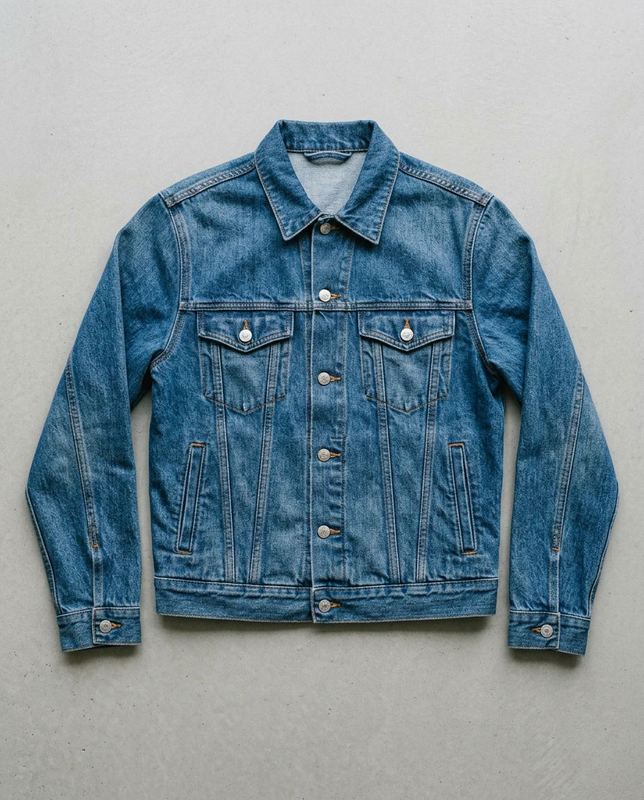 Generated stand-in
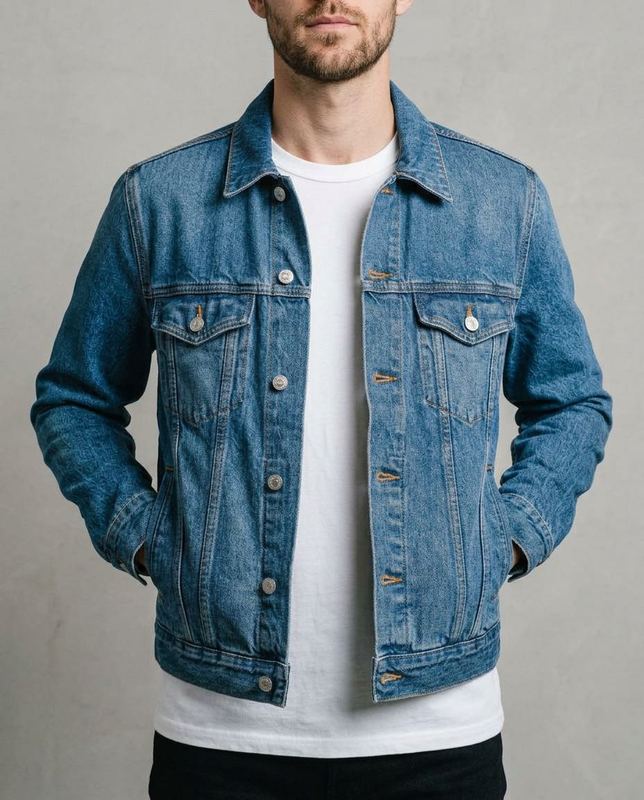 Generated
Check the chest pockets, the button placket and the fade against the flat lay.
The same jacket, laid flat and worn
Many clothing feeds carry a flat shot of each garment. The pair is a generated stand-in flat lay and a plain image-model edit of it, made outside our pipeline. The fit, the drape and the person are new, so the garment's details are what to check against the flat photo before a worn image goes on a row.
You run it
The one column a shoot sheet must have is a public link to each garment photo, so the image links already in your feed can fill it. A shoot takes up to 60 garments. Each comes back on a model you pick or on one of four mannequin forms, at 1K, 2K or 4K on the default setting, in square, portrait or story shapes.
We run it
Our team shoots from the photos already in your feed and keeps one model and one set across the range. Each batch arrives in 5 to 7 days.
Where the files go
The images download one at a time or as a zip. Hosting them and adding each link to its row is a feed step, which our Enriched Catalog product can take on. Many feeds start from flat shots, and flat lay photography covers how to shoot one that works as the input.
Which feed fields carry the images? What Google and Meta ask of each.
Each image rule belongs to a field on the row, so the fix happens on the row too. The Google Shopping feed guide covers the rest of Google's side.
| Field | What the platform asks | What to send |
|---|---|---|
| Main image | Google requires one per product that shows the entire product, with no border and no promotional text or watermark over it | Send the garment worn and whole, on a plain white or light background, at 1,500 by 1,500 pixels or more, as Google recommends |
| Additional images | Google takes up to 10 more per product, showing other angles or the product in use | Send the on-model and mannequin shots of the same garment and colorway |
| Lifestyle images | Google takes up to five, can show them in free listings and names clothing worn by a model as an example | Send worn shots in a real setting, such as a street, a room or a shop |
| Colorways | Meta requires every image to show the specific product for sale | Send one photo per colorway, and give each variant row the images of its own color |
| A changed image | Google and Meta both pick up a new image by its new URL, and Google can take up to six weeks when the URL stays the same | Upload every new image under a new URL instead of over the old file |
| Generated images | Google requires metadata marking the image as AI-generated, such as the IPTC DigitalSourceType tag, and asks that it stay on the file | Add the tag to any generated file that lacks it, QuickAds files included, before it goes in the feed |
Google's image link page sets the main-image rules, the new-URL advice and the metadata rule for generated images. Source Google takes up to 10 additional images per product. Source Its lifestyle image field takes up to five. Source Meta requires images that show the specific product for sale and a new URL for any replaced image. Source
What people ask about product feed optimization.
What is product feed optimization?
Product feed optimization is improving the data in your product feed so listings get approved and show the right product. It covers titles written the way shoppers search, required attributes on every variant, the right category and the images: a main image of the exact item for sale, extra views and, for clothing, shots of the garment worn.
What is a product feed?
A product feed is a file of your catalog, one row per product, that shopping and ad platforms such as Google Merchant Center and Meta read. Each row carries text fields like the title, price and availability, plus links to the product's images. The platform builds listings and catalog ads from those rows, so the images on a row are what shoppers see.
What is product feed management?
Product feed management is the pipeline: pulling products from your store, formatting them for each channel and sending the file on a schedule. Optimization is improving what travels through that pipeline, from titles and attributes to images. A feed can arrive on time every day and still carry one flat photo shared by every colorway.
What's the purpose of attributes in the product feed?
Attributes tell the platform what each product is, so it can match the row to searches, group variants and show the right details. For clothing, color and size tell the variants apart, and Google requires a color value for apparel in Shopping ads aimed at six countries, the US and the UK among them. The image links are attributes too.
How to optimize a product feed for Google Shopping?
Write titles the way shoppers search and fill every required attribute on each variant. For images, Google requires a main image of the entire product with no promotional overlay, recommends showing clothing worn by a person and takes up to 10 additional and five lifestyle images. Upload any changed image under a new URL, which Google usually crawls within three days.
Can AI-generated images be used in a product feed?
They can if they show the real product for sale, which Meta requires, and Google requires generated images to carry metadata saying they are AI-generated. QuickAds generates each garment on a model or a mannequin from one photo, and on the default setting scores each image keep or retry. The score is advice, and our files don't reliably carry the AI tag yet, so check each image and add the tag before it goes on a row.
One photo per garment, a worn image for every feed row.
QuickAds is a performance creative company that runs the whole chain: creative intelligence, creative strategy, creative production, influencer marketing and campaign management. Ecommerce fashion photography is the link that makes the on-model and mannequin images your feed rows point to.