Product catalog management for clothing, one variant at a time.
Every color and size of a style is a separate catalog row. Each one needs its fields filled and a photo of the right colorway.
Tell us what you sell. We'll come back with a photoshoot plan for your catalog.
Free. No card. We reply within one working day.
Product catalog management is keeping every product and variant in your catalog accurate, complete and consistent across the channels that read it. For clothing, that mostly means variants: each color and size is its own row, and each row needs its attributes filled and an image that shows its own colorway.
- A style in four colors and six sizes is 24 rows, tied together by one item group ID.
- Sizes of one color can share an image. Each color needs a photo of its own.
- Google requires color, size, gender and age group on clothing, and rejects numbers and hex codes as color names.
- One photo of each colorway is enough for QuickAds to put it on a model or a mannequin form.
- On the default setting, each image is color-measured against that photo where the garment can be isolated, and scored keep or retry as advice.
Last updated · QuickAds Editorial Team
Why is product catalog management harder for clothing? One style becomes dozens of rows.
A style in four colors and six sizes is 24 rows, so 200 styles make 4,800. Google treats each row as a product of its own, tied to the rest of its style by one item group ID, and three things go wrong on those rows again and again.
One photo for every color
The parent style's photo is inherited by every child row, so the olive listing says olive and shows black. Google asks for an image that shows what sets each variant apart, and lets sizes that look the same share one.
A required field left blank
Google requires color, size, gender and age group on clothing, for Shopping ads in six countries including the US. A row that misses one can be disapproved, and new drops are where they go missing.
Three names for one color
"Slate", "Slate Blue" and "SLT-02" in one catalog, because three people entered them over three seasons. Google requires the color name the product page uses, and rejects numbers and hex codes as colors.
Google asks for a unique image per variant, and allows one image across sizes that look the same. Source Color names should match the product page and can't be codes or numbers. Source
How do you get an image for every color? Photograph each colorway once.
Sizes of one color can share an image, so the count that matters is colorways. Send one photo of each, laid flat, on a hanger or worn, and the software puts it on a model you pick or on a mannequin form. A generated image can still drift in color, which is what the check is for.
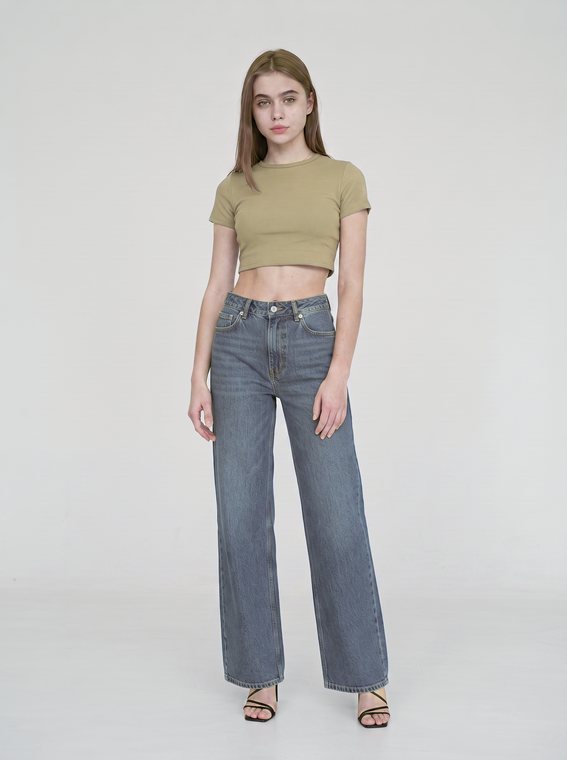 Generated
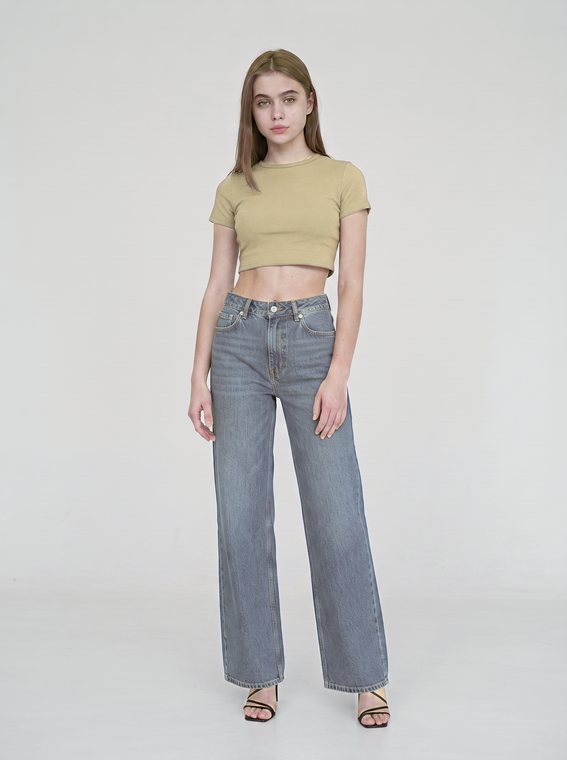 Generated
One jean from our August 18, 2026 test, generated from a published product photo: ΔE00 9.0 as returned, 1.3 with the correction replayed on a plain set. The replay was never a delivered file, and the crop top came out lighter too.
Color, measured on the garment
On the default setting, the software measures each garment image against your photo wherever the garment can be isolated. A bounded color correction is kept only when it measures closer.
Each image also gets a keep-or-retry score out of 100, with the reasons, while the color figure stays in our logs. The score is advice: a flagged image still arrives and is billed, so look at each colorway before it goes on a row. Google also requires generated images to carry an AI-generated tag, which our files don't reliably carry yet, so add it before an image goes on a Google row.
You run it
Send a sheet, a sheet link or a Drive folder of up to 60 garments per shoot. Put the SKU in the sheet's Name column, and each file in the zip carries it after a running number.
We run it
Our team shoots every colorway from the photos you already have, on one model and one set across the range. We ship 100+ creatives a week, and each batch arrives in 5 to 7 days.
Where the files go
The images download one at a time or as a zip. Adding each one to its variant's row is a feed step, covered in product feed optimization. Our Enriched Catalog product can take on that step and the field work as well.
Which fields does a clothing variant need? Five, and the image is one of them.
These five decide whether a style's rows group together, pass review and show the right photo. The rest of the feed is covered in Google Shopping feed.
| Field | What it holds | What goes wrong | The fix |
|---|---|---|---|
| Item group ID | Holds one ID shared by every color and size of a style | Goes wrong when each color is entered as a style of its own, so the variants never group | Fix it by giving every row of a style the same ID, and each style its own |
| Color | Holds the color name a shopper sees on the product page | Goes wrong when one color has three spellings, or a code in place of a name | Fix it with one list of color names, matched to the product page |
| Size | Holds one size per row, such as M or 32 | Goes wrong when several sizes are packed into one row, since only the first one counts | Fix it with one row per size, all under the style's ID |
| Gender and age group | Holds who the garment is for, such as female and adult | Goes wrong when a new drop goes live with the fields blank | Fix it by setting both once per style, so every row carries them |
| Image link | Holds the photo shown for that row | Goes wrong when every color points at the parent style's photo | Fix it with a photo of each colorway, shared across that color's sizes |
Google requires color, gender and age group on all clothing and accessories, and size on clothing and shoes, for Shopping ads in Brazil, France, Germany, Japan, the UK and the US. Source Every variant is its own product, with the same item group ID. Source
What people ask about product catalog management.
What is product catalog management?
Product catalog management is the work of keeping every product and variant in a catalog accurate, complete and consistent across the channels that read it, such as your store, Google and Meta. It covers the fields on each row, the category, the names and the images. For clothing, most of the work is variants, since every color and size is a row of its own.
What is catalog management in ecommerce?
In ecommerce, catalog management means running the product data that a store and its sales channels share: titles, prices, attributes, categories and images, one row per variant. The same catalog feeds the product pages, Google Shopping and catalog ads on Meta, so one wrong field shows up on every channel that reads it. Clothing adds the most rows, because each style multiplies by color and size.
How do you manage product variants in a clothing catalog?
Give every color and size its own row, and tie the rows of one style together with the same item group ID. Fill color, size, gender and age group on every row, using one list of color names that matches the product page. Then give each colorway its own image, which the sizes of that color can share.
Does every color and size need its own product image?
Every color does, and sizes usually don't. Google asks for an image that shows what sets each variant apart, and says sizes that look the same can share one image. So a jean in three washes and eight sizes needs three photos, one per wash, each showing that wash's true color.
How does AI assist in product catalog management?
AI helps most where a catalog is missing content: images that were never shot and fields nobody filled. QuickAds covers the image side, putting each colorway on a model or a mannequin form from one photo of it, up to 60 garments per shoot on the software. On the default setting, each image is color-measured against that photo where the garment can be isolated, and scored keep or retry as advice.
Do I need catalog management software or a service?
Software enforces rules on data you already have, like required fields and consistent color names. A service helps when the gap is content, such as colorways with no photo of their own. QuickAds does the image side both ways: software you run from one photo per garment, or our team running the shoots at 100+ creatives a week, each batch in 5 to 7 days.
One photo per colorway, a model shot for every row.
QuickAds is a performance creative company that runs the whole chain: creative intelligence, creative strategy, creative production, influencer marketing and campaign management. Ecommerce fashion photography is the link that puts every colorway in your catalog on a model or a mannequin, for the product page and each channel that reads the catalog.