
AI Brain Fry at Work: Fix the Review Handoff

In this fictional example, it’s 11 a.m. and a marketing team has six AI-assisted drafts and nothing it can send. A product update mentions a release date nobody approved. A sales summary points to a slide that’s already been replaced. An editor has three versions of a customer email and can’t tell which one includes the corrections. The team didn’t run out of ideas. It ran out of clear decisions.
If AI is making your work feel busier, pick one handoff to fix before adding another tool. Give the reviewer one current version, the sources for the claims that matter, and a specific decision to make. Put a limit on how many items can wait for review. Track how long accepted work takes from request to sign-off, not how quickly the first draft appears.
Researchers have used “AI brain fry” for experiences some workers report while using and overseeing AI. This guide uses the phrase only as shorthand for a workflow problem: more drafts arrive than the team can verify. It isn’t a diagnosis or health assessment, and the checklist is only for routine work such as writing a brief or reviewing a product announcement.
What the evidence says about review work
Three studies give us reasons to inspect the handoff. They answer different questions, so don’t combine them into a claim that AI makes people worse at their jobs.
The Boston Consulting Group study summary reports data from 1,488 U.S. workers at large companies. It gives context on how workers in that sample described using and monitoring AI. It doesn’t establish which tool or workflow caused an individual experience, or what a typical worker across all workplaces would report. The study does not set a review-queue limit for this guide.
A 2025 CHI survey asked 319 knowledge workers about critical thinking while using generative AI. They provided 936 examples from work. In those reports, critical thinking included verifying information and fitting the output into the work. These are reported perceptions and examples, not measured changes in reasoning ability. A useful question for a team is who will verify the next draft before someone acts on it.
A preregistered randomized experiment assigned 758 BCG consultants to conditions with or without GPT-4 access. AI helped on some of the study’s consulting tasks. On one complex managerial exercise chosen to test a limit of the tool, the groups with AI were less likely to reach the correct answer. That result does not characterize all analysis or current models. For your workflow, check decisions against the source even when a tool is useful for rewriting the same material.
None of these studies tested the specific workflow in this guide. Test it on your own low-risk work, keep notes and change it if it moves work around instead of making it easier to finish.
Pick the queue, not the tool
Start with one repeatable deliverable and one person whose sign-off makes it usable. A weekly product announcement is a good example: someone asks for it, somebody writes it, a product owner confirms what customers will see, and an editor prepares the final copy. Only then is it ready for the person who sends it. Don’t try to redesign every team’s AI workflow in the same week.
Take the last few comparable requests and write down where each one waited. Did writing take a long time, or did the reviewer wait for the source? Did the writer send two drafts because the actual approver needed different information? Did a last-minute version change mean someone checked a claim twice? Count the work that made the deliverable usable, even when it happened in messages rather than a document.
Make the review states simple. “Drafting” means the writer is still working and does not expect the reviewer to read it. “Ready” means the source and exact decision are included. “Hold” means someone needs to resolve a specific question. “Accepted” means the person with authority made the stated decision for the stated version. “Sent” or “released,” if needed, is a separate action. Accepting copy does not mean it has gone to customers.
| In the queue | What you need to see | What to do if it’s missing |
|---|---|---|
| Ready | A named reviewer, the exact version and what they need to decide | Return it to the writer rather than chasing the decision in several chats |
| Hold | One missing fact, approval or source and the person who can resolve it | Assign the next action and keep the item out of the ready queue |
| Accepted | A recorded decision on that version, with any remaining restrictions | Confirm it applies to the copy about to be used; reopen material changes |
| Released | A separate confirmation of where and when it went out | Don’t infer release from a comment or from green status in the draft checklist |
If two people review the same item, distinguish what each decides. A product owner can verify that a feature is available. They may not be the person who can approve timing or send customer email. Leave the groups in place if they’re useful; remove duplicate requests for the same decision.
Give every reviewer a short handoff card
A handoff should let the next person orient themselves before they read the draft. They should know what this is for, which version to look at, where to verify the consequential statements and what to do if something is wrong. The smallest version fits above a document link or on a project card.
- Decision: What you want the reviewer to accept, revise or hold.
- Version: The live document link and the specific revision or section to inspect.
- Sources: For each material statement, give the supporting table, note or passage and its date.
- Open issue: What remains uncertain, who owns it and when another check is due.
- Next action: Who uses the accepted version and whether separate approval is required.
Don’t send the reviewer a raw chat history and ask them to recover the brief. If AI proposed an interpretation, label it as such. If a source is missing, write that in the card rather than leaving a convincing sentence in the draft for the reviewer to discover. A bibliography can help someone read further; it doesn’t tell them which source supports the release date or what happens if the product changes.
Use the handoff to narrow the review. “Please verify the date and plan scope in paragraph two” is workable. “Can you check everything?” is usually a request to reconstruct someone else’s work. If someone spots a different serious issue, they should flag it. That’s different from requiring every reviewer to perform the same broad check. Keep language edits separate from evidence issues so a blocked claim doesn’t get lost next to a discussion about punctuation.
Work through one rejected claim
Use a fictional product announcement for the rehearsal. The sample product note, dated Tuesday, says, “Export beta is available to invited accounts. Broader timing is not confirmed.” The draft instead says, “All accounts can export reports starting Monday.” It changed two facts: who has access and when.
Filled review card: the export announcement
This authored text example is not a real team’s record or a product screenshot. Copy the five fields and replace every example value.
- Decision
- Verify the corrected audience and timing in r02, paragraph two; keep the announcement on hold until the product owner accepts that version. r01 was rejected.
- Version
- R02, paragraph two: “Invited accounts can use export in the beta. Timing for broader access isn’t confirmed.” Use r02 for this decision; r01 is superseded.
- Source
- Fictional Tuesday product note, entry 4: export beta is limited to invited accounts. No general release date is recorded.
- Open issue
- No confirmed timing for other accounts. Product owner rechecks the note Thursday. If the source changes, reopen r02.
- Next action
- Product owner verifies this version, then the editor incorporates it. The customer communications owner decides separately whether to send it. No send is requested on this card.
On r01, attach the source note and point to the exact sentence. The product reviewer rejects r01 because it changes both audience and timing. Then compare r02, paragraph two, with the same note before changing its status. A usable correction is, “Invited accounts can use export in the beta. Timing for broader access isn’t confirmed.” The reviewer verifies the replacement against the note, records the revision, and leaves any customer send with the appropriate owner. If the source note is no longer current, even that narrower line is on hold until someone confirms it. Changing the wording doesn’t repair a missing source.
Now imagine the writer generated three variations. The first has the right audience but still includes Monday. The second correctly leaves the date unconfirmed but says “all accounts.” The third is correct. Don’t stitch together approvals from the earlier versions. Choose one revision as the review object. Give the operator a record such as: “r02, paragraph two; scope narrowed to invited accounts; date removed; source note dated Tuesday; product owner verified; send not requested.” A future reader can reconstruct what changed without reading three drafts and ten messages.
If your team uses Google Docs, Suggesting mode lets a reviewer accept or reject proposed wording instead of having alternatives appear as silent edits. Version history can help users with edit access inspect earlier changes. If the editor accepts the suggestion in Docs, record the factual decision against the exact revision anyway. A change accepted in a document still is not permission to send the announcement. With a plain text or ticket workflow, a version label and decision note can serve the same editorial job. The point is to be able to show the difference and the authority behind it.
GitHub’s code-review workflow provides a comparison: with required reviews, a request for changes can block a merge.
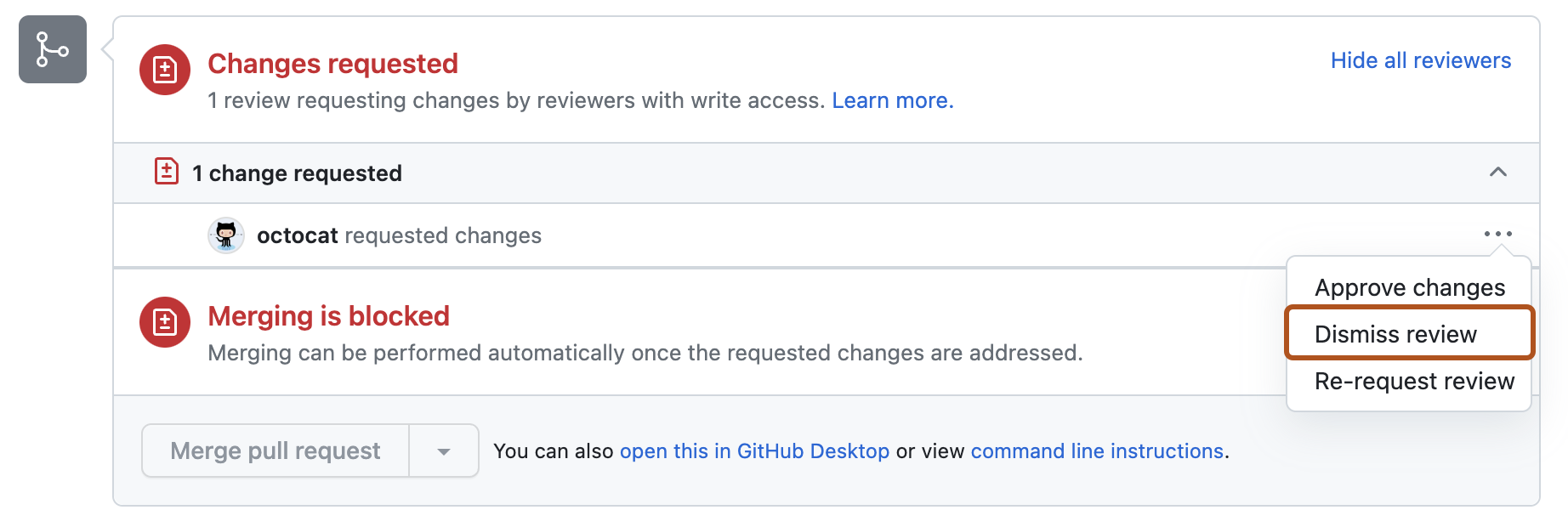
Use synthetic or authorized information for the rehearsal. An existing approved source belongs in the tool your team has agreed to use, not every model or app a colleague wants to try. If the practice example would require pasting customer information, use invented values with the same review challenge. The reviewer is learning to spot a changed claim, not to process actual customer records.
A small check can show whether your handoff would survive a change after acceptance. In the same fictional example, the owner decides on Thursday that invited accounts in two test groups will have different availability. Search for the claim in the planned email, help draft and account-team note. Do not assume a correction made in the working document automatically reached the copies. For each occurrence, check which audience it addresses and whether the updated source actually changes it. Then assign each changed copy to its own owner. Don’t rewrite everything just because the source date changed.
Do the check in reverse before sending. Have an editor who was not in the drafting conversation open the accepted copy and locate the current source, the specific decision and the next action. If they can do it without consulting the AI chat, the record is serving its purpose. If they can’t, repair the handoff before adding more checks or another review tool. Save what failed so the next team doesn’t have to discover the same missing approval.
Put a limit on what waits for review
A review queue has a capacity even if the drafting tool doesn’t. Let the reviewer choose a trial limit they can work with. One team might test keeping only two similar announcements ready at a time. If two are waiting, hold the third in drafting or pause new work until a decision is made. Two is a starting rule for the example, not a research-backed threshold. The right limit depends on the review cost and which deliverables are due.
Decide in advance what counts as an exception. If an urgent change needs the only reviewer, name what it displaces and notify the owner. Don’t create an emergency lane everybody can use without saying why. Give blockers to the person who can resolve them with one question and a date. An open problem should not be mistaken for occupying the same stage as a draft someone can accept now.
Set a default for revisions too. If the reviewer asks for one change, the writer makes that change in the agreed copy and marks it ready again. A fresh generated version creates another comparison job. Use one when the revision really needs a different structure, then make clear which earlier approvals still apply and which don’t. Keep superseded work available where appropriate without handing it to the reviewer as a menu.
Sometimes the best option is to stop using generation on one step. If source notes are scattered or models repeatedly change who can use a feature, it may be faster for the owner to write that sentence directly. AI can still help reformat a verified note after the decision. Don’t remove the human check just because the task was called routine on a different project.
Measure the work that actually made it out
Try the handoff on a small, comparable set of requests. Record first draft time, total time from request to accepted version, review rounds and the nature of any material correction. Write down whether several items waited for one person or a queue limit delayed an unexpectedly urgent request. You don’t need to read private prompts or track employee keystrokes. Use the work record to see where a process needs attention, not to rank people.
| Fictional example | Before the handoff card | With the handoff card |
|---|---|---|
| Time to first draft | 12 minutes | 18 minutes |
| Reviewer reading and checking | 35 minutes | 22 minutes |
| Writer rework for one correction | 23 minutes | 10 minutes |
| Total active work | 70 minutes | 50 minutes |
| Calendar time from request to acceptance | 1 day | Same afternoon |
The right column isn’t a benchmark. It shows a case in which preparation adds six minutes at the start and the team spends less active time later. Another team could spend longer if the source pack is hard to assemble. Record active time and waiting time separately. If a draft is finished in the morning but the decision happens the next day, nobody should credit the tool with resolving the wait.
Compare similar work. A short announcement with one supported fact isn’t equivalent to rewriting a launch page with five approvals. Report counts, scope and exceptions with your figures. In a small pilot, one unusually complex request can change the average. Include it and explain why, rather than dropping the inconvenient example or treating a tiny difference as proof.
At the end of the trial, choose what to do. Keep the card if reviewers can verify the right claims with fewer trips back to the writer. Simplify it if people spend more time filling out fields than deciding. Change the task boundary if the same kind of unsupported conclusion repeatedly enters the draft. If the only gain is first-draft speed and the same work waits longer to ship, fix the review path before scaling the tool.
Try this on a marketing brief
Pick a brief your team already has to produce this week. Let AI suggest structure or shorten wording if those uses are approved. Lock the customer promise, restrictions and evidence links. Ask a colleague to check the one sentence that would create a problem if the writer got it wrong. Use the same method on a proposed headline or feature statement: one version, the exact source, a named decision and a clear next step. Don’t turn the review into a vote on whether the whole document sounds polished.
If you work on ad creative, continue with QuickAds’ Creative Testing guide for related planning. QuickAds publishes this article and sells advertising tools. This handoff doesn’t depend on buying those tools. Try the five-field card on an existing brief before you add a template, automation or another system.
Questions before changing a team workflow
Does this mean we should stop using AI?
Not necessarily. Keep it where it helps produce usable work without creating more unowned checks. Test a narrower role when evidence, approval or final wording keeps slipping. This guide is about choosing and managing work steps, not diagnosing a reaction to a tool.
Is “reviewed by a person” enough?
No. Name the person, the decision, the exact version and what they verified. Someone who checks grammar has not necessarily checked that the source supports the claim. If the approval only covers one part, record that scope.
What should a solo writer do?
Use the same card as a self-review. Separate draft time from source checking, pick a version and verify the claim before using it. If something needs approval you don’t have, hold that part or ask the responsible person. Working alone doesn’t make an unsupported sentence safer.
About the author: Nitin Mahajan is the founder of QuickAds, the publisher of this article. The examples are editorial illustrations, not reported customer outcomes.





Privacy is important to us, so you have the option of disabling certain types of storage that may not be necessary for the basic functioning of the website. Blocking categories may impact your experience on the website. View Our Privacy Policy


