
6 Best Google Review Management Tools for Local Businesses in 2026
If one person can send the right Google review link and own every reply, start with Google Business Profile. Buy software for the failure you can name: missed post-job invitations (NiceJob), scattered listings and reviews (BrightLocal), branch reporting (GatherUp), or complaints that never get assigned (Birdeye). For counter service, test ReviewCook only if every customer gets the same direct route to Google.
Ask each vendor what a dissatisfied customer sees after opening a request. They need the same straightforward path to Google as a customer who loved the service. If the vendor can’t show that, drop it from the shortlist. Jump to the demo script.
Nitin Mahajan is the founder of QuickAds, which publishes this guide.
The shortlist at a glance
Match the tool to the job that keeps getting missed. Prices are vendor-published US dollars, not estimates of review volume or proof that a feature works in your setup.
| Option | When it makes sense | Published software price or buying basis | What to verify before buying |
|---|---|---|---|
| Google Business Profile | One location with a reliable manual routine | No separate fee for the native review link or QR code | Who will send invitations and respond, and how will you log that work? |
| ReviewCook | In-person service with QR-first requests | $0 with a documented one-location cap; $8 monthly for one location or $18 for three, per ReviewCook | Direct Google alternative, no sentiment filtering, and customer control over any transcription or draft |
| NiceJob Starter | A service business wants review requests tied to completed jobs | $95 per month on the main pricing page; Pro is $135 per month | Your exact job trigger, branch routing and any separate multi-location terms |
| BrightLocal Grow | A local team also needs listing management or search reporting | $65 monthly or $584 billed annually for one location; $87 monthly or $782 annually for 2–5 locations, per the location table | SMS credits, campaign permissions, and whether your source system needs a manual step |
| GatherUp Reputation Management | A manager wants requests, replies and location-level reporting together | $99 per month equivalent on the displayed annual plan for one location; public multi-location pricing varies by count and billing period (pricing) | Exact three-location rate, commitment, request allowances and Google reply permissions |
| Birdeye Reviews | A central team needs review filters, escalation and a shared queue | Request pricing; no fixed public like-for-like price established | Which modules, tickets, roles, locations and exports the quote includes |
How the options were selected
This comparison draws on vendor pricing, product documentation and Google policy checked November 23, 2026. Each option documents a way to work with Google reviews and serves a different operational job.
This is document-based research, not a hands-on test of sending, profile connections, deliverability, review lift or private contracts. Vendor help screens demonstrate the documented feature, not an independent product test. The scenario below uses the same branch count, request load and staffing for every option.
Six options, and when to choose each
1. Google Business Profile: start here if the work is still manageable
A verified business can request reviews with a Google link or QR code and reply in the profile. Put the link on receipts or in a follow-up. Google also allows displaying a code in your store, but its Maps policy says not to require or pressure customers to rate or review while on site. Let them decide whether and when to post.
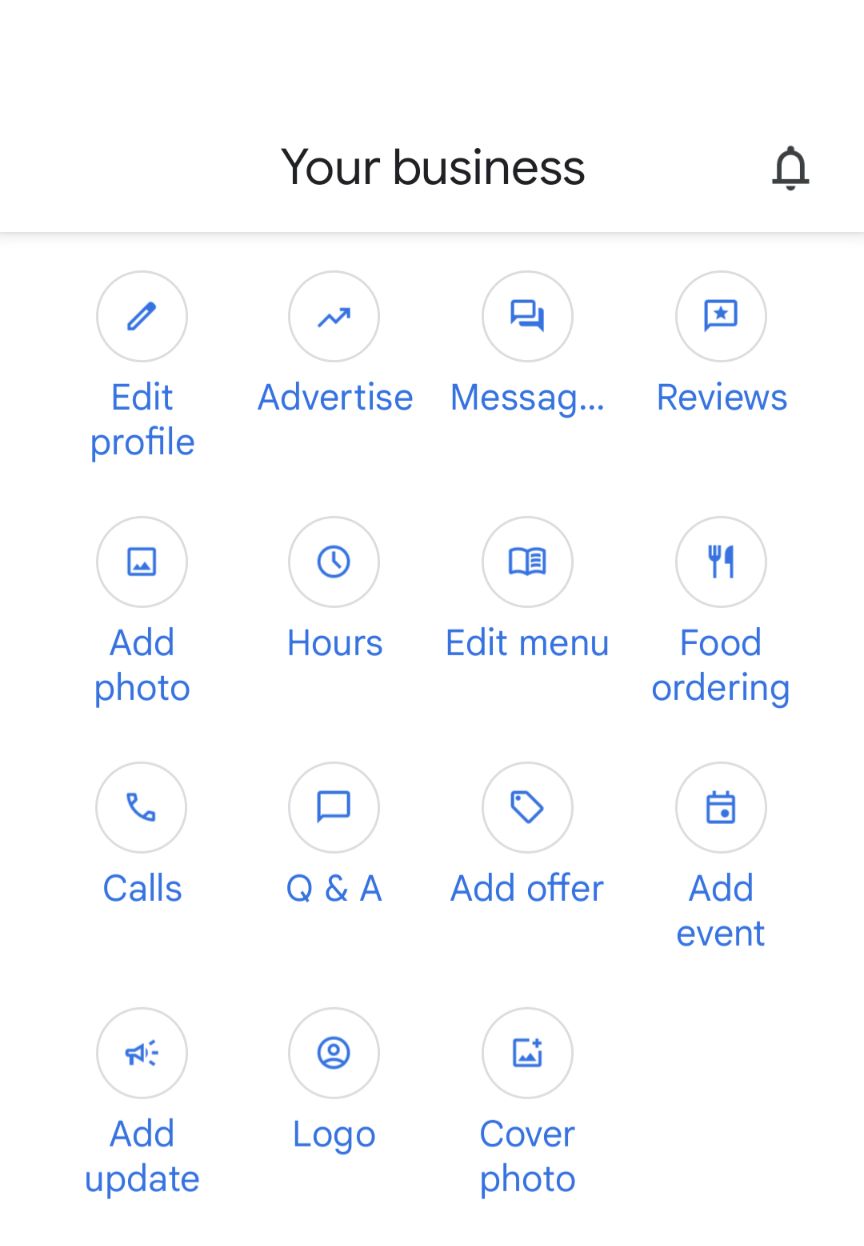
In the Business Profile shown below, open Reviews to find the review you want to respond to. Google’s instructions for managing reviews cover the reply step.
A workable setup for a small repair shop is simple: put the correct link on its service-completion receipt, let the manager check new reviews daily and keep an internal list of unresolved issues. If customers already get the link consistently and someone responds promptly, another inbox may only introduce another thing the team has to check.
The weakness appears when nobody can answer basic operational questions: Were both branches sending requests last week? Which branch did the customer actually visit? Who is responsible for a late reply? Google’s native link gives people a route to leave a review; it doesn’t replace your job-completion trigger, staff handoff, or consolidated operating report. If those gaps are real, price the work your team is doing manually before choosing software.
2. ReviewCook: a QR-first option with a customer-flow check
ReviewCook describes a QR flow for voice or text feedback. Its product and pricing page lists a free one-location tier capped at 20 reviews collected monthly, an $8 monthly one-location tier and an $18 monthly three-location tier. Its merchant reply drafts and approval rules apply after a review is published. That is separate from customer-side AI draft suggestions and private-feedback routing, which the terms describe as plan-dependent.
ReviewCook’s FAQ says the flow does not prompt for a rating or suggest topics. Its June 2026 anti-spam policy describes selecting a rating and editing an AI-assisted draft. The product walkthrough uses a five-star illustration; it does not show how any rating was chosen. The vendor materials differ. They do not establish what the current account shows or that reviews are gated. Demo both satisfied and dissatisfied paths without submitting: check for the same direct Google route, no preselected rating or invented claims, and customer control over what to publish. If you can’t verify those conditions, use the native link.
Editorial context: An earlier edition led with ReviewCook. This one uses the same public-source criteria for every option and does not name an overall winner.
3. NiceJob: good shortlist for service teams that miss the follow-up
NiceJob’s documented Get Reviews campaign sends SMS and scheduled email follow-ups to help collect reviews on channels including Google. The vendor includes it in Starter and Pro. Its main pricing page lists Starter at $95 monthly and Pro at $135 monthly, with AI review replies in Pro. Its campaign help distinguishes review collection from the referral, rebooking and survey campaigns. Don’t pay for the larger plan just because it has more campaign types if your problem is simply not asking.
Bring synthetic versions of a completed job, a canceled job, a reopened job and a contact who opted out. Ask which record qualifies, how the location is selected, and whether a single completion can trigger multiple invitations when two integrations are connected. Ask for the exact settings or an exported event log rather than accepting “we integrate with your CRM.”
This is not the default recommendation for a franchise buyer who needs separate location permissions, central escalation and a written cost for all branches. NiceJob notes that multi-location and franchise terms can differ; the $95 starting price doesn’t tell you what a three-location rollout costs. Keep any referral or thank-you campaigns separate from Google review requests. A feature’s presence in the suite is not permission to use it as a review incentive.
4. BrightLocal Grow: a stronger starting point when listings and local search are also in scope
BrightLocal’s Grow plan lists review monitoring, responses and review requests alongside the features of its lower tiers, which include local visibility and listings tools. The published US table gives a combined subscription price for two to five locations, which is useful when you want to cost a modest expansion before sitting through a demo.
For an agency, the practical question is whether a location manager can do the work without being able to change the wrong client’s settings. BrightLocal’s campaign instructions and dashboard screenshots show the Location Dashboard, the Get Reviews tab and how client access fits into campaign setup. They also note that SMS access for clients is disabled by default and requires available credits. BrightLocal’s June 2024 Get Reviews example shows the template and review destination as separate settings. Ask to see the current interface: choose the North branch’s template, confirm its Google destination, then switch to a branch user and verify that South’s settings are out of reach. Don’t share a live login.
A buyer who already likes their listing and local rank reporting tools shouldn’t assume every Grow feature is extra value. Ask how your source workflow creates or imports contact records and what staff must do when a connector fails. Check the route to Google for everyone. BrightLocal’s additional-feedback help shows how some templates add steps after lower scores while still giving respondents a public review link. Choose a direct, equal route rather than a detour based on sentiment.
5. GatherUp: put branch-level follow-up and reporting side by side
GatherUp’s Location Dashboard guide describes tiles for review requests, replies, progress and feedback insights. That makes it worth demoing when a central office needs to see a branch’s work but wants local managers to handle routine responses. It’s especially helpful to separate first-party feedback collected in your own workflow from third-party reviews published on Google or other sites. They’re different datasets and serve different decisions.
Ask the vendor to switch between two sample branches while you watch. Check whether the overdue replies, request counts and reports actually change with the location and whether a local user can see or act on another branch’s queue. The help documentation identifies 30-day windows for some dashboard tiles and notes that eligibility to reply can depend on permissions and Google authorization. Have the vendor show a date-filtered report for anything your team reviews quarterly.
GatherUp’s pricing page separates Reputation Management, Review Defense and Listings Management. The base one-location annual-plan equivalent is $99 per month on the page; multi-location prices depend on count and billing. Don’t add a dispute feature to the comparison unless you actually need it, and don’t infer that buying one gets negative reviews removed. Google decides whether flagged reviews violate its policies.
6. Birdeye: consider it when routing and escalation need a dedicated workflow
Birdeye’s review feed documentation shows a shared review feed where users can filter by source, date and status, reply from the dashboard and access actions such as creating a ticket. Its reporting help documents location and response-rate reporting. Some reports are restricted by plan or role. Confirm reporting access as well as ticketing.
Ask for a demo that begins with an unresolved review and ends with an assigned owner and an auditable status change. A good test: a central coordinator filters for unreplied Google reviews, sends an issue to the South branch, and checks two days later whether that branch addressed it. Ask whether the quoted configuration covers each step, including ticketing if needed, rather than assuming every documented feature comes with Reviews.
Birdeye’s pricing flow asks for business details. Request a written quote that separates required review features from optional modules and lists setup, minimum term, add-location pricing and what you can export. If the operational problem is one missed post-job text, the broader system may be more than you need. Make the larger commitment prove it reduces missed work for the roles that will actually use it.
Worked example: three branches, 600 completed jobs per month
Picture a home services company with three branches, each completing 200 jobs per month. Every customer who had a genuine experience gets the same chance to review, subject to contact permissions and opt-outs. The team wants one invitation per eligible job, no rating-based selection, a branch-specific review link, and a central view of reviews awaiting response. There’s one coordinator and one manager at each branch. For a fair first comparison, assume no review incentives, no paid listings add-ons and no additional reminder texts. 600 jobs is a workload assumption, not 600 deliverable messages or 600 new reviews.
| Option | Three-location software basis | What this price does not settle |
|---|---|---|
| Google Business Profile | $0 separate review-software subscription | Time for sending, logging and replying; any cost of an existing sending tool |
| ReviewCook | $18 monthly for three location connections, or $216 at the same monthly rate for 12 months | Native SMS automation not established for this scenario; confirm queue access, exact use limits and steering-free setup |
| NiceJob | Written three-location price required | Per-location terms, event routing, and whether the central queue meets the brief |
| BrightLocal Grow | $87 month to month; $1,044 for 12 months at that rate, or $782 billed annually | SMS costs and work needed to connect the job trigger |
| GatherUp | Ask for the exact three-location price and term | Included request volume, add-ons and exact quote by location count |
| Birdeye | Written quote required | Required modules, contract term, onboarding, sending allowances and exports |
BrightLocal’s annual total is $262 lower than paying its monthly rate for 12 months. Month-to-month still lets you stop after a short pilot. For every quote, calculate first-year cash outlay = subscription installments, onboarding, required add-ons and projected usage charges actually payable within the first 12 months, plus applicable taxes. Use the billing schedule. Show the full contractual commitment separately if any payments fall beyond that window, and model staff time separately. Don’t present the spend as a cost per review unless you have measured attributable review outcomes.
A rough way to decide whether it’s worth testing: at a hypothetical $30 per hour fully loaded, saving 90 minutes of administrative work per week is about $195 per month over a 52-week year. Saving 30 minutes per week is about $65 per month. These are conditional labor values, not measured savings, and they assume you can use the freed time productively. Include setup time and exceptions in the pilot. A reviewer who must fix the branch on every fifth invite can erase the benefit of a cheap subscription faster than a pricing table suggests.
Use this demo script with every finalist
Stop at preview in mock demos. Never send test invitations by SMS or email to real customers or post a public test review.
- Trace a completed job end to end. Use a vendor demo or authorized test record. Reopen it, mark it complete again and check whether it sends twice. Pass when only the intended branch’s link would be sent once. Repeat with a contact who has opted out and check nothing goes out to that channel.
- Inspect the customer’s experience twice. Use one satisfied and one dissatisfied hypothetical response in a safe test environment. Both should have the same public review opportunity. Look beyond the first screen: extra clicks, a private-only branch or an offer to post may change what customers can do.
- Test a complaint with the roles you actually employ. Put a mock complaint in the right branch queue, assign a named owner in the test, draft a reply and verify permissions using staff-level accounts. Check whether your coordinator can see that an item was addressed without opening every branch.
- Walk away with records you can use. Request a sample export of branch, time, invitation status and reply status. Check which items are excluded, how far back the data goes and what a real account can export at cancellation. Don’t give a vendor a live customer list just to see the shape of an export.
Record eligible completed jobs, unique invitations, bounces, opt-outs and new public reviews by branch during a limited pilot. Keep link clicks apart from posted reviews: BrightLocal explains that its campaign stops tracking after the visitor leaves the form for a review site. A busy week can lift review counts without the tool being the reason.
Example go/no-go scorecard. Feed the demo 14 distinct fictional job events plus one unchanged replay of an already processed completion: six eligible completions, three opted-out completions, one cancellation, and a reopening followed by a second completion for each of two previously completed jobs. Expect six correctly routed previews. Neither a replay with the same event ID nor a second completion with the same job key may add a preview. Assign an owner and follow-up date to each of the three mock complaints. Fail the demo if satisfied and dissatisfied customers don’t have the same unobstructed path to leave a Google review. Missing evidence does not pass. If both finalists pass, compare staff time and written costs.
What not to automate
Google prohibits incentives for reviews and selective requests for positive reviews. Its Maps contribution policy also prohibits discouraging negative reviews. Ask neutrally: “If you’d like to share how the visit went, you can leave a Google review here.” Do not make a discount conditional on a review, ask someone to remove criticism for a refund, or send public-review invitations only to customers who scored well on a private survey. You can offer private feedback as an additional route, not a substitute reserved for people who might criticize you.
For replies, a draft can save typing. Keep a human on anything that mentions a dispute, account information or a specific person. A public reply should acknowledge the issue without confirming details that don’t belong on a review page. Route the investigation into your normal private support process. A genuine review is not a policy violation just because it’s negative; use Google’s reporting route when there is a specific policy reason rather than sending mass disputes.
Frequently asked questions
Do I need software to get Google reviews?
No. Use Google’s link or QR code if somebody can share it reliably and handle replies. Buy software to fix a specific job that keeps slipping, not to add another inbox.
Which option should I trial first?
Use the native link as a baseline. Then trial the lowest-commitment option that addresses your biggest workflow gap. Run the scorecard before connecting live customer data or signing an annual agreement.
Will Google review software improve my local rankings?
A vendor can help make requests and replies more consistent; this comparison did not measure or establish that any tool improves rankings. Track profile visibility separately from invitation delivery, new reviews, staff time and response backlog. If all you can prove at the end of a pilot is that more eligible jobs get an honest request and fewer complaints are left unassigned, that is still a result you can use to make the buying decision.




Privacy is important to us, so you have the option of disabling certain types of storage that may not be necessary for the basic functioning of the website. Blocking categories may impact your experience on the website. View Our Privacy Policy


